Terminal
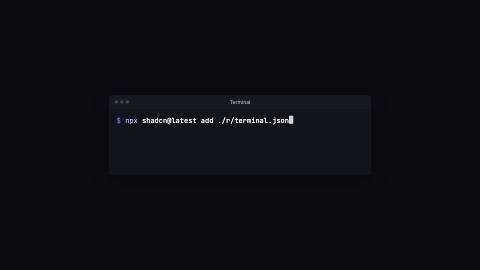
Terminal window that types commands, prints their output line by line and scrolls as it fills.
Terminal, install
Installation
npx shadcn add https://www.reelcn.dev/r/terminal.jsonFiles land in src/reelcn/ with the items it builds on.
Usage
<Center>
  <Terminal
    lines={[
      { type: "command", text: "npx shadcn@latest add ./r/terminal.json" },
      { type: "output", text: "Created 3 files" },
    ]}
  />
</Center>
Props
PropTypeDescription
delaynumberFrames to wait before entering.
durationnumberEnter duration in frames. Defaults to 0.6s. Some items reuse
duration for an unrelated local timing. See that item's own prop docs.exitnumber | booleanExit at the end of the parent `<Sequence>`.
false keeps it on screen, a number sets the exit length in frames.motionMotionPersonalityOverride the theme's motion personality.
posterbooleanRenders fully entered, with no exit: for a still frame or thumbnail. Defaults to
false.holdFramesnumberDelays the start of the exit window by this many frames, for a minimum on-screen hold. Defaults to
0.lines*TerminalLine[]
titlestringWindow title. Default
"Terminal".promptstringPrinted before every command. Default
"$".cpsnumberCommand typing speed in characters per second. Default
32.pausenumberFrames the prompt waits before a command starts typing. Defaults to 0.4s.
outputDelaynumberFrames between pressing enter and the first output line. Defaults to 0.3s.
outputStaggernumberFrames between output lines.
highlightbooleanColor commands with the bash tokenizer. Default
true.rowsnumberVisible rows; older lines scroll out the top. Defaults to every line, capped to fit the safe area.
fontSizenumberLargest font size in design units. It shrinks so the longest line fits. Default
28.widthnumberWindow width as a fraction of the safe area (0–1). Defaults to 0.62 in landscape, 1 otherwise.
backgroundstringTerminal background. Defaults to a shade between the theme surface and background.
borderColorstring
promptColorstringPrompt color. Defaults to the theme accent.
outputColorstringOutput text color. Defaults to a softened foreground.
radiusnumberCorner radius in design units. Defaults to 60% of the theme radius.
followCaretFollowZooms the camera to trail the caret as it types. Omitted (default): today's behavior, unchanged.
styleCSSProperties
classNamestring
Built from
Use
- Install steps, CLI demos and deploy logs in product and tutorial videos
- Any sequence of shell commands with their output
Avoid
- Source files or snippets without a prompt. Use
code-block
Guides
Components take their colors from a theme, their timing from motion props and their layout from the canvas.
Source
registry/items/terminal.tsx
/**
 * @title Terminal
 * @category product
 * @description Terminal window that types commands, prints their output line by line and scrolls as it fills.
 * @duration data-driven
 * @use Install steps, CLI demos and deploy logs in product and tutorial videos
 * @use Any sequence of shell commands with their output
 * @avoid Source files or snippets without a prompt. Use `code-block`
 * @tags terminal, shell, cli, command, console, install
 * @example
 * <Center>
 *   <Terminal
 *     lines={[
 *       { type: "command", text: "npx shadcn@latest add ./r/terminal.json" },
 *       { type: "output", text: "Created 3 files" },
 *     ]}
 *   />
 * </Center>
 */
import type React from "react";
import { type Token, tokenColors, tokenize } from "./code-tokens";
import {
  alpha,
  type CaretFollow,
  FollowCaret,
  type MotionProps,
  tween,
  useMotion,
  useTextMetrics,
  useTheme,
  useTypedText,
  useViewport,
} from "./core";

export type TerminalLine = { type: "command"; text: string } | { type: "output"; text: string };

export type TerminalProps = MotionProps & {
  lines: TerminalLine[];
  /** Window title. */
  title?: string;
  /** Printed before every command. */
  prompt?: string;
  /** Command typing speed in characters per second. */
  cps?: number;
  /** Frames the prompt waits before a command starts typing. Defaults to 0.4s. */
  pause?: number;
  /** Frames between pressing enter and the first output line. Defaults to 0.3s. */
  outputDelay?: number;
  /** Frames between output lines. */
  outputStagger?: number;
  /** Color commands with the bash tokenizer. */
  highlight?: boolean;
  /** Visible rows; older lines scroll out the top. Defaults to every line, capped to fit the safe area. */
  rows?: number;
  /** Largest font size in design units. It shrinks so the longest line fits. */
  fontSize?: number;
  /** Window width as a fraction of the safe area (0–1). Defaults to 0.62 in landscape, 1 otherwise. */
  width?: number;
  /** Terminal background. Defaults to a shade between the theme surface and background. */
  background?: string;
  borderColor?: string;
  /** Prompt color. Defaults to the theme accent. */
  promptColor?: string;
  /** Output text color. Defaults to a softened foreground. */
  outputColor?: string;
  /** Corner radius in design units. Defaults to 60% of the theme radius. */
  radius?: number;
  /** Zooms the camera to trail the caret as it types. Omitted (default): today's behavior, unchanged. */
  follow?: CaretFollow;
  style?: React.CSSProperties;
  className?: string;
};

/** Advance width of one monospace glyph, in em. */
const CHAR = 0.6;
const LINE = 1.55;

type Row = { kind: "command" | "output" | "prompt"; text: string; at: number; typeFrom: number };

export function Terminal({
  lines,
  title = "Terminal",
  prompt = "$",
  cps = 32,
  pause,
  outputDelay,
  outputStagger,
  highlight = true,
  rows: rowsProp,
  fontSize = 28,
  width: widthFraction,
  background,
  borderColor,
  promptColor,
  outputColor,
  radius,
  follow,
  style,
  className,
  ...motion
}: TerminalProps) {
  const theme = useTheme();
  const { u, width, height, safe, isLandscape } = useViewport();
  const m = useMotion(motion);
  const outputStaggerFrames = outputStagger ?? Math.round(m.fps * (3 / 30));
  const palette = tokenColors(theme.colors);
  const border = borderColor ?? theme.colors.border;
  const waitFrames = pause ?? Math.round(m.fps * 0.4);
  const enterFrames = outputDelay ?? Math.round(m.fps * 0.3);

  // Schedule every row: a command's prompt appears, waits, types, then its output prints line by line.
  const timeline: Row[] = [];
  let t = m.delay + Math.round(m.enterFrames * 0.5);
  for (const line of lines) {
    if (line.type === "command") {
      timeline.push({ kind: "command", text: line.text, at: t, typeFrom: t + waitFrames });
      t += waitFrames + Math.ceil((line.text.length * m.fps) / cps) + enterFrames;
    } else {
      timeline.push({ kind: "output", text: line.text, at: t, typeFrom: t });
      t += outputStaggerFrames;
    }
  }
  timeline.push({ kind: "prompt", text: "", at: t, typeFrom: t });

  // Layout: the font shrinks until the widest line fits; the window keeps a fixed number of rows.
  const titleH = u(52);
  const padX = u(30);
  const padY = u(24);
  const maxW = (width - safe.x * 2) * (widthFraction ?? (isLandscape ? 0.62 : 1));
  const maxH = height - safe.top - safe.bottom;
  const longest = Math.max(
    12,
    ...timeline.map((row) => (row.kind === "output" ? row.text.length : prompt.length + 1 + row.text.length + 1)),
  );
  const fontPx = Math.min(u(fontSize), (maxW - padX * 2) / (longest * CHAR));
  const lineH = fontPx * LINE;
  const fitRows = Math.max(1, Math.floor((maxH - titleH - padY * 2) / lineH));
  const rowCount = Math.min(rowsProp ?? timeline.length, fitRows);

  // Rows fade in over a few frames and the view scrolls smoothly once they overflow.
  const appear = (at: number) => Math.min(1, tween(m.frame, m.fps, { from: at, duration: 4, motion: "smooth" }));
  const visible = timeline.filter((row) => m.frame >= row.at);
  const filled = timeline.reduce((sum, row) => sum + appear(row.at), 0);
  const scroll = Math.max(0, filled - rowCount) * lineH;
  const active = visible[visible.length - 1];
  const blinkOn = Math.floor(m.frame / Math.round(m.fps * 0.5)) % 2 === 0;

  // Follow: the active row's caret position `lag` frames ago. `useTypedText` is pure, so calling it a
  // second time here (conditionally, since there may be no active row yet) isn't a Rules-of-Hooks
  // issue, only `useTextMetrics` below is a real hook, and it's called unconditionally, once.
  const laggedFrame = m.frame - (follow?.lag ?? 6);
  const activeHasCaret = active !== undefined && active.kind !== "output";
  const laggedTyped = activeHasCaret ? useTypedText(active.text, laggedFrame - active.typeFrom, m.fps, { cps }) : null;
  const laggedPrefix =
    active?.kind === "command" ? `${prompt} ${laggedTyped?.visible ?? ""}` : (laggedTyped?.visible ?? "");
  const caretMetrics = useTextMetrics(
    laggedPrefix,
    { fontFamily: theme.fonts.mono, fontSize: fontPx, fontWeight: 500 },
    { skip: !follow },
  );
  const activeRowIndex = active ? visible.indexOf(active) : 0;
  const caretPosition = { x: caretMetrics.width, y: activeRowIndex * lineH };

  const renderRow = (row: Row, index: number) => {
    if (row.kind === "output") {
      return (
        <span
          style={{ color: outputColor ?? `color-mix(in srgb, ${theme.colors.foreground} 72%, ${theme.colors.muted})` }}
        >
          {row.text}
        </span>
      );
    }
    const typed = useTypedText(row.text, m.frame - row.typeFrom, m.fps, { cps });
    const typedChars = typed.visible.length;
    const typing = m.frame >= row.typeFrom && !typed.done;
    const tokens: Token[] = highlight
      ? tokenize(row.text.slice(0, typedChars), "bash")[0]
      : [{ text: row.text.slice(0, typedChars), kind: "plain" }];
    const caret = row === active && (typing || blinkOn);
    return (
      <>
        <span style={{ color: promptColor ?? theme.colors.accent }}>{prompt} </span>
        {tokens.map((token, k) => (
          <span key={`${index}-${k}`} style={{ color: palette[token.kind] }}>
            {token.text}
          </span>
        ))}
        {caret && (
          <span
            style={{
              display: "inline-block",
              width: "0.6em",
              height: "1.15em",
              verticalAlign: "-0.2em",
              background: alpha(theme.colors.foreground, 0.85),
            }}
          />
        )}
      </>
    );
  };

  return (
    <FollowCaret follow={follow} caret={caretPosition}>
      <div
        className={className}
        style={{
          width: maxW,
          borderRadius: u(radius ?? theme.radius * 0.6),
          overflow: "hidden",
          background: background ?? `color-mix(in srgb, ${theme.colors.surface} 55%, ${theme.colors.background})`,
          border: `1px solid ${border}`,
          boxShadow: `0 ${u(2)}px ${u(6)}px ${alpha("#000000", 0.12)}, 0 ${u(28)}px ${u(72)}px ${alpha("#000000", 0.3)}`,
          opacity: Math.min(1, Math.max(0, m.enter)) * (1 - m.exit),
          translate: `0 ${(1 - m.enter) * u(40) - m.exit * u(24)}px`,
          scale: String(0.97 + 0.03 * m.enter),
          ...style,
        }}
      >
        <div
          style={{
            display: "grid",
            gridTemplateColumns: "1fr auto 1fr",
            alignItems: "center",
            height: titleH,
            padding: `0 ${u(22)}px`,
            background: theme.colors.surface,
            borderBottom: `1px solid ${border}`,
            fontFamily: theme.fonts.body,
            fontSize: u(20),
            fontWeight: 500,
            color: theme.colors.muted,
          }}
        >
          <div style={{ display: "flex", gap: u(9) }}>
            {[0, 1, 2].map((dot) => (
              <div
                key={dot}
                style={{ width: u(13), height: u(13), borderRadius: "50%", background: alpha(theme.colors.muted, 0.4) }}
              />
            ))}
          </div>
          <div>{title}</div>
        </div>
        <div
          style={{
            height: rowCount * lineH + padY * 2,
            padding: `${padY}px ${padX}px`,
            overflow: "hidden",
            fontFamily: theme.fonts.mono,
            fontSize: fontPx,
            lineHeight: `${lineH}px`,
            color: theme.colors.foreground,
          }}
        >
          <div style={{ translate: `0 ${-scroll}px` }}>
            {visible.map((row, index) => (
              <div
                key={index}
                style={{ height: lineH, whiteSpace: "pre", overflow: "hidden", opacity: appear(row.at) }}
              >
                {renderRow(row, index)}
              </div>
            ))}
          </div>
        </div>
      </div>
    </FollowCaret>
  );
}