Phone frame
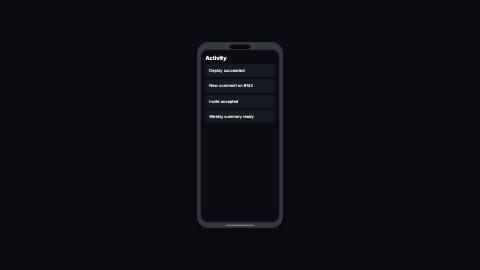
Rounded phone body with a pill cutout at the top and a gesture bar at the bottom, clipping your screen content to the display's corners.
PhoneFrame, feed
Installation
npx shadcn add https://www.reelcn.dev/r/phone-frame.jsonFiles land in src/reelcn/ with the items it builds on.
Usage
<Center>
  <PhoneFrame>
    <div style={{ width: "100%", height: "100%", background: "#fff" }} />
  </PhoneFrame>
</Center>
Props
PropTypeDescription
delaynumberFrames to wait before entering.
durationnumberEnter duration in frames. Defaults to 0.6s. Some items reuse
duration for an unrelated local timing. See that item's own prop docs.exitnumber | booleanExit at the end of the parent `<Sequence>`.
false keeps it on screen, a number sets the exit length in frames.motionMotionPersonalityOverride the theme's motion personality.
posterbooleanRenders fully entered, with no exit: for a still frame or thumbnail. Defaults to
false.holdFramesnumberDelays the start of the exit window by this many frames, for a minimum on-screen hold. Defaults to
0.heightnumberFrame height as a fraction of the safe area (0–1). Defaults to 0.86 in portrait, 0.82 otherwise.
aspectnumberScreen aspect ratio (width / height). Defaults to 9/19.5. Default
9 / 19.5.childrenReactNode
colorstringBody color. Defaults to a shade between the theme surface and foreground.
screenColorstringScreen fill behind the children. Defaults to the theme background.
styleCSSProperties
classNamestring
Built from
Use
- Framing an app screen, onboarding flow or social feed in a product video
- Two phones side by side inside `split-screen` for a before/after
Avoid
- A laptop or desktop screen. Use
laptop-frame
Guides
Components take their colors from a theme, their timing from motion props and their layout from the canvas.
Source
registry/items/phone-frame.tsx
/**
 * @title Phone Frame
 * @category product
 * @description Rounded phone body with a pill cutout at the top and a gesture bar at the bottom, clipping your screen content to the display's corners.
 * @duration data-driven
 * @use Framing an app screen, onboarding flow or social feed in a product video
 * @use Two phones side by side inside `split-screen` for a before/after
 * @avoid A laptop or desktop screen. Use `laptop-frame`
 * @tags phone, mobile, device, mockup, frame, app
 * @example
 * <Center>
 *   <PhoneFrame>
 *     <div style={{ width: "100%", height: "100%", background: "#fff" }} />
 *   </PhoneFrame>
 * </Center>
 */
import type React from "react";
import { alpha, type MotionProps, useMotion, useTheme, useViewport } from "./core";

export type PhoneFrameProps = MotionProps & {
  /** Frame height as a fraction of the safe area (0–1). Defaults to 0.86 in portrait, 0.82 otherwise. */
  height?: number;
  /** Screen aspect ratio (width / height). Defaults to 9/19.5. */
  aspect?: number;
  children?: React.ReactNode;
  /** Body color. Defaults to a shade between the theme surface and foreground. */
  color?: string;
  /** Screen fill behind the children. Defaults to the theme background. */
  screenColor?: string;
  style?: React.CSSProperties;
  className?: string;
};

export function PhoneFrame({
  height: heightFraction,
  aspect = 9 / 19.5,
  children,
  color,
  screenColor,
  style,
  className,
  ...motion
}: PhoneFrameProps) {
  const theme = useTheme();
  const { u, width, height, safe, isPortrait } = useViewport();
  const m = useMotion(motion);
  const body = color ?? `color-mix(in srgb, ${theme.colors.foreground} 14%, ${theme.colors.surface})`;
  const maxH = (height - safe.top - safe.bottom) * (heightFraction ?? (isPortrait ? 0.86 : 0.82));
  const maxW = width - safe.x * 2;
  const frameH = Math.min(maxH, maxW / aspect);
  const frameW = frameH * aspect;
  const bezelSide = u(14);
  const bezelTop = u(30);
  const bezelBottom = u(22);
  const outerRadius = u(46);
  const screenRadius = u(32);
  const screenW = frameW - bezelSide * 2;
  const screenH = frameH - bezelTop - bezelBottom;

  return (
    <div
      className={className}
      style={{
        position: "relative",
        width: frameW,
        height: frameH,
        borderRadius: outerRadius,
        background: body,
        boxShadow: `inset 0 0 0 ${u(2)}px ${alpha("#000000", 0.25)}`,
        opacity: Math.min(1, Math.max(0, m.enter)) * (1 - m.exit),
        translate: `0 ${(1 - m.enter) * u(50) - m.exit * u(28)}px`,
        transform: "perspective(1400px) rotateX(3deg) rotateY(-2deg)",
        transformStyle: "preserve-3d",
        scale: String(0.94 + 0.06 * m.enter),
        filter: `drop-shadow(0 ${u(theme.material?.floorShadow === "soft" ? 40 : 24)}px ${u(theme.material?.floorShadow === "soft" ? 50 : 16)}px ${alpha(theme.colors.shadow, theme.material?.floorShadow === "soft" ? 0.26 : 0.4)})`,
        ...style,
      }}
    >
      <div
        style={{
          position: "absolute",
          left: bezelSide,
          top: bezelTop,
          width: screenW,
          height: screenH,
          borderRadius: screenRadius,
          overflow: "hidden",
          background: screenColor ?? theme.colors.background,
        }}
      >
        {children}
        {/* Key-light sheen: one clipped highlight sweep across the glass, at most once, on load (rule M9). */}
        <div
          aria-hidden="true"
          style={{
            position: "absolute",
            inset: 0,
            pointerEvents: "none",
            background: `linear-gradient(115deg, transparent 20%, ${alpha("#ffffff", 0.16)} 32%, transparent 44%)`,
            translate: `${-40 + 180 * Math.min(m.enter, 1)}% 0`,
            opacity: m.enter > 0 && m.enter < 1.4 ? 1 : 0,
          }}
        />
      </div>
      {/* Camera/sensor cutout, a hole in the bezel, so it stays near-black regardless of theme. */}
      <div
        style={{
          position: "absolute",
          left: "50%",
          top: u(10),
          translate: "-50% 0",
          width: u(84),
          height: u(18),
          borderRadius: u(9),
          background: alpha("#000000", 0.85),
        }}
      />
      <div
        style={{
          position: "absolute",
          left: "50%",
          bottom: u(8),
          translate: "-50% 0",
          width: u(110),
          height: u(5),
          borderRadius: u(3),
          background: alpha(theme.colors.foreground, 0.35),
        }}
      />
    </div>
  );
}