Command palette
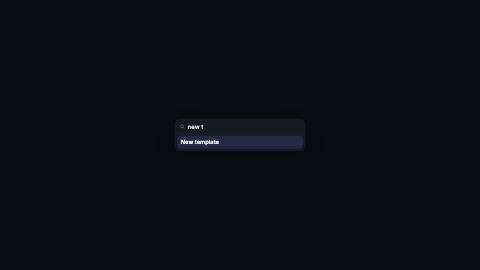
Search panel that types a query, narrows the list live, glides its highlight to the surviving match and presses it.
CommandPalette, filter
Installation
npx shadcn add https://www.reelcn.dev/r/command-palette.jsonFiles land in src/reelcn/ with the items it builds on.
Usage
<Center>
  <CommandPalette
    items={[{ label: "New project" }, { label: "New template" }, { label: "Open settings" }]}
    query="new t"
    select="New template"
    selectAt={70}
  />
</Center>
Props
PropTypeDescription
delaynumberFrames to wait before entering.
durationnumberEnter duration in frames. Defaults to 0.6s. Some items reuse
duration for an unrelated local timing. See that item's own prop docs.exitnumber | booleanExit at the end of the parent `<Sequence>`.
false keeps it on screen, a number sets the exit length in frames.motionMotionPersonalityOverride the theme's motion personality.
posterbooleanRenders fully entered, with no exit: for a still frame or thumbnail. Defaults to
false.holdFramesnumberDelays the start of the exit window by this many frames, for a minimum on-screen hold. Defaults to
0.items*CommandItem[]
query*stringTyped into the search field, character by character.
cpsnumberQuery typing speed in characters per second. Default
14.selectstringLabel of the item that stays selected as the list narrows. Defaults to the first item.
selectAtnumberFrame the selected row is "pressed", counted from
delay. Omit to just leave it highlighted.widthnumberPanel width in design units. Default
520.backgroundstring
borderColorstring
textColorstring
mutedColorstring
accentColorstring
radiusnumber
followCaretFollowZooms the camera to trail the caret as it types. Omitted (default): today's behavior, unchanged.
styleCSSProperties
classNamestring
Built from
Use
- A ⌘K launcher, quick switcher or fuzzy search in a product demo
- Showing how fast a search or command feature narrows results
Avoid
- A shell session with commands and output. Use
terminal
Guides
Components take their colors from a theme, their timing from motion props and their layout from the canvas.
Source
registry/items/command-palette.tsx
/**
 * @title Command Palette
 * @category product
 * @description Search panel that types a query, narrows the list live, glides its highlight to the surviving match and presses it.
 * @duration data-driven
 * @use A ⌘K launcher, quick switcher or fuzzy search in a product demo
 * @use Showing how fast a search or command feature narrows results
 * @avoid A shell session with commands and output. Use `terminal`
 * @tags command palette, search, cmdk, launcher, fuzzy, shortcut
 * @example
 * <Center>
 *   <CommandPalette
 *     items={[{ label: "New project" }, { label: "New template" }, { label: "Open settings" }]}
 *     query="new t"
 *     select="New template"
 *     selectAt={70}
 *   />
 * </Center>
 */
import type React from "react";
import {
  alpha,
  type CaretFollow,
  FollowCaret,
  type MotionProps,
  tween,
  useMotion,
  useTextMetrics,
  useTheme,
  useTypedText,
  useViewport,
} from "./core";

export type CommandItem = {
  label: string;
  /** Shown right-aligned, muted: a shortcut or category. */
  hint?: string;
};

export type CommandPaletteProps = MotionProps & {
  items: CommandItem[];
  /** Typed into the search field, character by character. */
  query: string;
  /** Query typing speed in characters per second. */
  cps?: number;
  /** Label of the item that stays selected as the list narrows. Defaults to the first item. */
  select?: string;
  /** Frame the selected row is "pressed", counted from `delay`. Omit to just leave it highlighted. */
  selectAt?: number;
  /** Panel width in design units. */
  width?: number;
  background?: string;
  borderColor?: string;
  textColor?: string;
  mutedColor?: string;
  accentColor?: string;
  radius?: number;
  /** Zooms the camera to trail the caret as it types. Omitted (default): today's behavior, unchanged. */
  follow?: CaretFollow;
  style?: React.CSSProperties;
  className?: string;
};

const clamp01 = (value: number) => Math.min(Math.max(value, 0), 1);

export function CommandPalette({
  items,
  query,
  cps = 14,
  select,
  selectAt,
  width = 520,
  background,
  borderColor,
  textColor,
  mutedColor,
  accentColor,
  radius,
  follow,
  style,
  className,
  ...motion
}: CommandPaletteProps) {
  const theme = useTheme();
  const { u } = useViewport();
  const m = useMotion(motion);
  const border = borderColor ?? theme.colors.border;
  const accent = accentColor ?? theme.colors.accent;
  const boxW = u(width);
  const rowH = u(52);
  const targetLabel = select ?? (items.length > 0 ? items[0].label : "");

  const filteredAt = (prefix: string) => {
    const q = prefix.toLowerCase();
    return items.filter((item) => item.label.toLowerCase().indexOf(q) >= 0);
  };
  const indexOfTarget = (prefix: string) => {
    const labels = filteredAt(prefix).map((item) => item.label);
    const i = labels.indexOf(targetLabel);
    return i < 0 ? 0 : i;
  };

  const start = m.delay + Math.round(m.enterFrames * 0.4);
  const typedText = useTypedText(query, m.frame - start, m.fps, { cps });
  const typed = typedText.visible;
  const typing = !typedText.done;

  // Follow: the caret position `lag` frames ago, from the same typed-length logic above evaluated at an
  // earlier frame. Always computed (cheap, pure), only measured/used when `follow` is set. Command
  // palette is single-line, so `y` is always the query row's fixed y-offset, no line-counting needed.
  const laggedTyped = useTypedText(query, m.frame - (follow?.lag ?? 6) - start, m.fps, { cps });
  const caretMetrics = useTextMetrics(
    laggedTyped.visible,
    { fontFamily: theme.fonts.body, fontSize: u(24), fontWeight: 400 },
    { skip: !follow },
  );
  const caretPosition = { x: caretMetrics.width, y: u(29) };
  const blinkOn = Math.floor(m.frame / Math.round(m.fps * 0.5)) % 2 === 0;
  const filtered = filteredAt(typed);

  // The target's row only moves at a char boundary, when typing more of the query removes a row above it.
  // Walking those boundaries (there are at most query.length of them) finds where the current glide began.
  const settleFrames = Math.round(m.fps * 0.28);
  let currentRow = indexOfTarget("");
  let fromRow = currentRow;
  let fromFrame = start;
  for (let len = 1; len <= query.length; len++) {
    const frame = start + Math.ceil((len * m.fps) / cps);
    if (frame > m.frame) break;
    const row = indexOfTarget(query.slice(0, len));
    if (row !== currentRow) {
      fromRow = currentRow;
      fromFrame = frame;
      currentRow = row;
    }
  }
  const settle = clamp01(tween(m.frame, m.fps, { from: fromFrame, duration: settleFrames, motion: "snappy" }));
  const highlightRow = fromRow + (currentRow - fromRow) * settle;

  const pressWindow = Math.round(m.fps * 0.6);
  const pressed = selectAt !== undefined ? Math.max(0, 1 - Math.abs(m.frame - (m.delay + selectAt)) / pressWindow) : 0;
  const listShown = clamp01(m.enter);

  return (
    <FollowCaret follow={follow} caret={caretPosition}>
      <div
        className={className}
        style={{
          width: boxW,
          borderRadius: u(radius ?? theme.radius),
          overflow: "hidden",
          background: background ?? theme.colors.surface,
          border: `1px solid ${border}`,
          boxShadow: `0 ${u(24)}px ${u(64)}px ${alpha("#000000", 0.35)}`,
          fontFamily: theme.fonts.body,
          opacity: clamp01(m.enter) * (1 - m.exit),
          translate: `0 ${(1 - clamp01(m.enter)) * u(24)}px`,
          ...style,
        }}
      >
        <div
          style={{
            display: "flex",
            alignItems: "center",
            gap: u(12),
            padding: `0 ${u(18)}px`,
            height: u(58),
            borderBottom: `1px solid ${border}`,
          }}
        >
          <svg
            aria-hidden="true"
            viewBox="0 0 24 24"
            width={u(20)}
            height={u(20)}
            fill="none"
            stroke={mutedColor ?? theme.colors.muted}
            strokeWidth={2.2}
            strokeLinecap="round"
          >
            <circle cx="11" cy="11" r="7" />
            <path d="M21 21l-4.3-4.3" />
          </svg>
          <div style={{ fontSize: u(24), color: textColor ?? theme.colors.foreground }}>
            {typed}
            <span style={{ opacity: typing || blinkOn ? 1 : 0, color: accent }}>|</span>
          </div>
        </div>
        <div style={{ position: "relative", padding: u(8) }}>
          {filtered.length > 0 && (
            <div
              style={{
                position: "absolute",
                left: u(8),
                right: u(8),
                top: u(8) + highlightRow * rowH,
                height: rowH,
                borderRadius: u(radius ?? theme.radius * 0.6),
                background: alpha(accent, 0.16 + 0.3 * pressed),
                opacity: listShown,
              }}
            />
          )}
          {filtered.map((item, index) => {
            const rowIn = clamp01(
              tween(m.frame, m.fps, {
                from: start + index * Math.round(m.fps * (2 / 30)),
                duration: Math.round(m.fps * 0.3),
                motion: "smooth",
              }),
            );
            const active = item.label === targetLabel;
            return (
              <div
                key={item.label}
                style={{
                  position: "relative",
                  display: "flex",
                  justifyContent: "space-between",
                  alignItems: "center",
                  height: rowH,
                  padding: `0 ${u(14)}px`,
                  fontSize: u(23),
                  color: active ? (textColor ?? theme.colors.foreground) : (mutedColor ?? theme.colors.muted),
                  fontWeight: active ? 600 : 400,
                  opacity: rowIn,
                  scale: active ? String(1 - 0.02 * pressed) : "1",
                }}
              >
                <span>{item.label}</span>
                {item.hint && (
                  <span style={{ fontSize: u(18), color: mutedColor ?? theme.colors.muted }}>{item.hint}</span>
                )}
              </div>
            );
          })}
          {filtered.length === 0 && (
            <div style={{ padding: `${u(18)}px ${u(14)}px`, color: mutedColor ?? theme.colors.muted, fontSize: u(22) }}>
              No matches
            </div>
          )}
        </div>
      </div>
    </FollowCaret>
  );
}