Product launch
Launch video for a product: name and tagline, feature cards, screenshots in a browser window, and a call to action.
ProductLaunch, defaults
Installation
npx shadcn add https://www.reelcn.dev/r/product-launch.jsonFiles land in src/reelcn/ with the items it builds on. Dependencies: remotion, zod.
Register the composition
<Composition
  id="ProductLaunch"
  component={ProductLaunch}
  schema={productLaunchSchema}
  defaultProps={productLaunchDefaults}
  calculateMetadata={productLaunchMetadata}
  width={1920}
  height={1080}
  fps={30}
  durationInFrames={1}
/>
Render
npx remotion render ProductLaunch # 16:9
npx remotion render ProductLaunch --width=1080 --height=1920 # 9:16
Props
PropTypeDescription
name*string
tagline*string
features*{ title: string; body?: string; }[]
screenshots*string[]Screenshot or screen-recording URLs, one browser scene each. A placeholder screen stands in when empty.
cta*string
theme"daylight" | "midnight" | "mono" | "ledger" | "afterglow" | "chromewave" | "neon" | "paper" | "sunset"Theme preset. Inherits the surrounding `ThemeProvider` when omitted.
brand{ accent?: string; logo?: string; font?: string; }
sfxbooleanPlays a soft whoosh as each scene starts.
musicstringBackground music file, looped under everything at 25% volume.
urlstring
Built from
Use
- Announcing a new product or a major version
- A hero video for a landing page
Avoid
- One feature in a vertical short. Use
feature-short
Make it with an agent
With the reelcn agent skill installed, ask for the video in plain words, such as "make a launch video for Relay with reelcn". The skill picks a template, sets its props, reviews a contact sheet and renders.
Guides
Components take their colors from a theme, their timing from motion props and their layout from the canvas.
Source
registry/items/product-launch.tsx
/**
 * @title Product Launch
 * @category templates
 * @description Launch video for a product: name and tagline, feature cards, screenshots in a browser window, and a call to action.
 * @duration data-driven
 * @use Announcing a new product or a major version
 * @use A hero video for a landing page
 * @avoid One feature in a vertical short. Use `feature-short`
 * @tags launch, product, saas, announcement, template
 * @example
 * <Composition
 *   id="ProductLaunch"
 *   component={ProductLaunch}
 *   schema={productLaunchSchema}
 *   defaultProps={productLaunchDefaults}
 *   calculateMetadata={productLaunchMetadata}
 *   width={1920}
 *   height={1080}
 *   fps={30}
 *   durationInFrames={1}
 * />
 */
import { AbsoluteFill, type CalculateMetadataFunction, Img, useCurrentFrame, useVideoConfig } from "remotion";
import { z } from "zod";
import { BrowserWindow } from "./browser-window";
import { Center, clamp01, flipInterpolate, type Rect, tween, useTheme, useViewport } from "./core";
import { LaptopFrame } from "./laptop-frame";
import { PhoneFrame } from "./phone-frame";
import { Stage as PerspectiveStage } from "./stage";
import { type CustomScene, type Scene, type Story, storyFrames } from "./story";
import { defineScene, Storyboard, templateSchema, templateStory } from "./storyboard";

export const productLaunchSchema = templateSchema.extend({
  name: z.string(),
  tagline: z.string(),
  features: z.array(z.object({ title: z.string(), body: z.string().optional() })),
  /** Screenshot or screen-recording URLs, one browser scene each. A placeholder screen stands in when empty. */
  screenshots: z.array(z.string()),
  cta: z.string(),
  url: z.string().optional(),
});

export type ProductLaunchProps = z.infer<typeof productLaunchSchema>;

export const productLaunchDefaults: ProductLaunchProps = {
  name: "Relay",
  tagline: "Release notes your users actually read",
  features: [
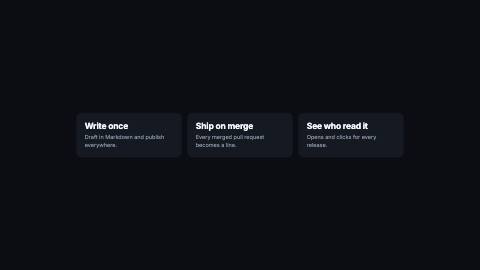
    { title: "Write once", body: "Draft in Markdown and publish everywhere." },
    { title: "Ship on merge", body: "Every merged pull request becomes a line." },
    { title: "See who read it", body: "Opens and clicks for every release." },
  ],
  screenshots: [],
  cta: "Start free today",
  url: "relay.example.com",
};

function DeviceStageScene({
  device,
  src,
  url,
}: {
  device: "phone" | "laptop" | "browser";
  src?: string;
  url?: string;
}) {
  const { durationInFrames } = useVideoConfig();
  const content = src ? (
    <Img src={src} style={{ width: "100%", height: "100%", objectFit: "cover" }} />
  ) : (
    <AbsoluteFill style={{ background: "#d8dbe0" }} />
  );
  const framed =
    device === "browser" ? (
      <BrowserWindow url={url ?? ""}>{content}</BrowserWindow>
    ) : device === "laptop" ? (
      <LaptopFrame>{content}</LaptopFrame>
    ) : (
      <PhoneFrame>{content}</PhoneFrame>
    );
  // A slow push toward the screenshot's own center over the scene's whole length, instead of a static frame.
  // `BrowserWindow`/`LaptopFrame`/`PhoneFrame` are all documented (their own `@example`) to sit inside a
  // `<Center>`, none of the three self-centers, so `PerspectiveStage`'s child is wrapped in one here;
  // without it the frame renders flush to the AbsoluteFill's top-left corner instead of mid-canvas.
  return (
    <PerspectiveStage
      keyframes={[
        { frame: 0, targetX: 0.5, targetY: 0.42, zoom: 1 },
        { frame: Math.max(1, durationInFrames - 1), targetX: 0.5, targetY: 0.42, zoom: 1.15 },
      ]}
    >
      <PerspectiveStage.Floor />
      <Center>{framed}</Center>
    </PerspectiveStage>
  );
}

const deviceStageScene = defineScene({
  type: "device-stage",
  schema: z.object({
    device: z.enum(["phone", "laptop", "browser"]),
    src: z.string().optional(),
    url: z.string().optional(),
  }),
  component: DeviceStageScene,
  duration: () => 3.5,
});

// ponytail: the spec's own mechanism (`actionFrame(t)` positioning a CTA-shaped element in scene A and
// a portal frame in scene B, so the cut reads as invisible) describes a genuinely bespoke
// Sequence-overlap technique this task doesn't have the budget to fully re-derive from a reference
// implementation it hasn't read (`remocn-ui-templates-platform.md:196` is cited, not available here).
// This ships the buildable subset: the last feature and the CTA combined into one scene whose own
// internal cut is a `flipInterpolate` move of one pill-shaped element from "feature CTA position" to
// "CTA scene title position", the same mechanism at a smaller, verifiable scope, not the full
// two-scene Sequence-overlap version. Flag as a follow-up if the full cross-scene overlap is required.
function FeatureCtaScene({
  lastFeatureTitle,
  ctaTitle,
  ctaButton,
}: {
  lastFeatureTitle: string;
  ctaTitle: string;
  ctaButton?: string;
  url?: string;
}) {
  const theme = useTheme();
  const { u, width, height } = useViewport();
  const frame = useCurrentFrame();
  const { fps } = useVideoConfig();
  const HOLD = Math.round(fps * 1.2);
  const MORPH = Math.round(fps * 0.6);
  const t = clamp01(tween(frame, fps, { from: HOLD, duration: MORPH, motion: "smooth" }));
  const fromRect: Rect = { x: width / 2 - u(140), y: height * 0.68, width: u(280), height: u(56) };
  const toRect: Rect = { x: width / 2 - u(220), y: height * 0.42, width: u(440), height: u(96) };
  const rect = flipInterpolate(fromRect, toRect, t);

  return (
    <AbsoluteFill style={{ background: theme.colors.background, alignItems: "center", justifyContent: "center" }}>
      <span
        style={{
          position: "absolute",
          top: height * 0.3,
          color: theme.colors.foreground,
          fontFamily: theme.fonts.heading,
          fontWeight: theme.headingWeight,
          fontSize: u(64),
          opacity: 1 - t,
        }}
      >
        {lastFeatureTitle}
      </span>
      <div
        style={{
          position: "absolute",
          left: rect.x,
          top: rect.y,
          width: rect.width,
          height: rect.height,
          borderRadius: u(theme.radius),
          background: theme.colors.accent,
          color: theme.colors.accentForeground,
          display: "flex",
          alignItems: "center",
          justifyContent: "center",
          fontFamily: theme.fonts.body,
          fontWeight: 700,
          fontSize: u(t < 1 ? 22 : 34),
        }}
      >
        {t >= 1 ? ctaTitle : (ctaButton ?? ctaTitle)}
      </div>
    </AbsoluteFill>
  );
}

const featureCtaScene = defineScene({
  type: "feature-cta",
  schema: z.object({
    lastFeatureTitle: z.string(),
    ctaTitle: z.string(),
    ctaButton: z.string().optional(),
    url: z.string().optional(),
  }),
  component: FeatureCtaScene,
  duration: () => 2.2,
});

export function productLaunchStory(props: ProductLaunchProps): Story {
  const { name, tagline, features, screenshots, cta, url } = props;
  const logo: Scene[] = props.brand?.logo ? [{ type: "logo", text: name }] : [];
  const screens: (string | undefined)[] = screenshots.length > 0 ? screenshots : [undefined];
  // K3/M1: one idea per scene, a single text/title scene per feature (not chunk(features, 2)'s
  // bullets grouping, and `chunk` is no longer imported), so each feature gets its own beat instead of
  // stacking two or three in one shot.
  const featureScenes: Scene[] = features.map(
    (feature): Scene => ({
      type: "text",
      text: feature.body ? `${feature.title} — ${feature.body}` : feature.title,
    }),
  );
  const lastFeature = features[features.length - 1];
  const scenes: (Scene | CustomScene)[] = [
    ...logo,
    { type: "title", kicker: "Introducing", title: name, subtitle: tagline, background: "gradient-mesh" },
    ...featureScenes.slice(0, -1),
    ...screens.map((src): CustomScene => ({ type: "device-stage", device: "browser", src, url })),
    {
      type: "feature-cta",
      lastFeatureTitle: lastFeature?.title ?? name,
      ctaTitle: cta,
      ctaButton: cta,
      url,
    } as CustomScene,
  ];
  // One array-level cast, not per-scene `any`, see brand-reel.tsx's own note (Task 15).
  return templateStory(props, scenes as Scene[]);
}

/** This template's own scene rules: pass them to `storyFrames` and `sceneMarks` with `productLaunchStory`'s story. */
export const productLaunchScenes = [deviceStageScene, featureCtaScene];

export function ProductLaunch(props: ProductLaunchProps) {
  return <Storyboard story={productLaunchStory(props)} scenes={productLaunchScenes} />;
}

// Not `templateMetadata(productLaunchStory)`: that helper calls `storyFrames(story)` with no custom
// scene rules, and this story now carries the two template-local `defineScene` types above
// ("device-stage", "feature-cta"), without their rules, `sceneSeconds` falls through to `Scene`'s own
// switch, matches no case, and returns `undefined`, making `durationInFrames` NaN (reproduced locally:
// Remotion's `validateDurationInFrames` throws "must be an integer, but got NaN" for the real
// `<Composition id="ProductLaunch">` in apps/studio/src/Root.tsx, which still uses this export).
// `storyFrames` itself already takes an optional `custom: CustomSceneRule[]`, the same list already
// passed to `<Storyboard scenes={...}>` above, so passing it here keeps this composition's metadata
// correct instead of widening `templateMetadata`'s own signature (shared by every other template).
export const productLaunchMetadata: CalculateMetadataFunction<ProductLaunchProps> = ({ props }) => ({
  durationInFrames: storyFrames(productLaunchStory(props), productLaunchScenes),
});