Code live
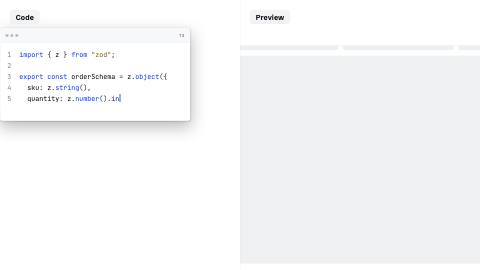
Code types beside a live preview pane that swaps images the moment typing crosses each preview's line. A content-derived schedule, not a hand-timed cut.
CodeLive, defaults
Installation
npx shadcn add https://www.reelcn.dev/r/code-live.jsonFiles land in src/reelcn/ with the items it builds on. Dependencies: remotion, zod.
Register the composition
<Composition
  id="CodeLive"
  component={CodeLive}
  schema={codeLiveSchema}
  defaultProps={codeLiveDefaults}
  calculateMetadata={codeLiveMetadata}
  width={1920} height={1080} fps={30} durationInFrames={1}
/>
Render
npx remotion render CodeLive # 16:9
npx remotion render CodeLive --width=1080 --height=1920 # 9:16
Props
PropTypeDescription
code*string
theme"daylight" | "midnight" | "mono" | "ledger" | "afterglow" | "chromewave" | "neon" | "paper" | "sunset"Theme preset. Inherits the surrounding `ThemeProvider` when omitted.
brand{ accent?: string; logo?: string; font?: string; }
sfxbooleanPlays a soft whoosh as each scene starts.
musicstringBackground music file, looped under everything at 25% volume.
language"ts" | "js" | "tsx" | "py" | "bash" | "json"
previews{ atLine: number; src: string; }[]Screenshots to swap in as typing crosses each `atLine`. Omitted: the preview pane stays a plain
surface fill, this default has no local asset to point at (Task 20 final-gate fix: the previous
`/preview-empty.png`/`/preview-filled.png` defaults were local paths with no file behind them,
broken in any real consumer project). Pass real screenshot URLs to see the swap. Default
[].Built from
Use
- A dev-tool or API launch that shows the code and its result side by side
- A tutorial beat where the reader sees code and output update together
Avoid
- A single static code block with no preview. Use
code-blockdirectly
Make it with an agent
With the reelcn agent skill installed, ask for the video in plain words, such as "make a launch video for Relay with reelcn". The skill picks a template, sets its props, reviews a contact sheet and renders.
Guides
Components take their colors from a theme, their timing from motion props and their layout from the canvas.
Source
registry/items/code-live.tsx
/**
 * @title Code Live
 * @category templates
 * @description Code types beside a live preview pane that swaps images the moment typing crosses each preview's line. A content-derived schedule, not a hand-timed cut.
 * @duration data-driven
 * @use A dev-tool or API launch that shows the code and its result side by side
 * @use A tutorial beat where the reader sees code and output update together
 * @avoid A single static code block with no preview. Use `code-block` directly
 * @tags code, live, preview, split, template
 * @example
 * <Composition
 *   id="CodeLive"
 *   component={CodeLive}
 *   schema={codeLiveSchema}
 *   defaultProps={codeLiveDefaults}
 *   calculateMetadata={codeLiveMetadata}
 *   width={1920} height={1080} fps={30} durationInFrames={1}
 * />
 */
import { AbsoluteFill, type CalculateMetadataFunction, Img, useCurrentFrame, useVideoConfig } from "remotion";
import { z } from "zod";
import { CodeBlock } from "./code-block";
import { codeLivePreviewSchedule, useTheme, useViewport } from "./core";
import { SplitScreen } from "./split-screen";
import type { CustomScene, Scene, Story } from "./story";
import { CODE_CPS, LANGUAGES, storyFrames } from "./story";
import { defineScene, Storyboard, templateSchema, templateStory } from "./storyboard";

export const codeLiveSchema = templateSchema.extend({
  code: z.string(),
  language: z.enum(LANGUAGES).optional(),
  /** Screenshots to swap in as typing crosses each `atLine`. Omitted: the preview pane stays a plain
   * surface fill, this default has no local asset to point at (Task 20 final-gate fix: the previous
   * `/preview-empty.png`/`/preview-filled.png` defaults were local paths with no file behind them,
   * broken in any real consumer project). Pass real screenshot URLs to see the swap. */
  previews: z.array(z.object({ atLine: z.number(), src: z.string() })).optional(),
});

export type CodeLiveProps = z.infer<typeof codeLiveSchema>;

export const codeLiveDefaults: CodeLiveProps = {
  code: [
    'import { z } from "zod";',
    "",
    "export const orderSchema = z.object({",
    "  sku: z.string(),",
    "  quantity: z.number().int().positive(),",
    "});",
  ].join("\n"),
  language: "ts",
  previews: [],
};

function CodeLiveScene({
  code,
  language,
  previews = [],
}: {
  code: string;
  language?: (typeof LANGUAGES)[number];
  previews?: { atLine: number; src: string }[];
}) {
  const theme = useTheme();
  const frame = useCurrentFrame();
  const { fps } = useVideoConfig();
  const { isPortrait, safe, u } = useViewport();
  const schedule = codeLivePreviewSchedule(code, previews, fps, CODE_CPS);
  let activeIndex = -1;
  for (let i = 0; i < schedule.length; i++) if (schedule[i] <= frame) activeIndex = i;
  const activeSrc = activeIndex >= 0 ? previews[activeIndex].src : undefined;

  // `SplitScreen` floats each pane's own label at a fixed inset, `safe.top` for a portrait first row
  // (clearing a platform's own top UI), `u(40)` for every other pane. Push this pane's own content down
  // by that same inset plus the badge's footprint, so "Code" never sits on running code (T1).
  const badgeClear = (inset: number) => inset + u(56) + u(16);
  const codeInset = badgeClear(isPortrait ? safe.top : u(40));
  // The preview is a full-bleed, author-supplied screenshot, its own content can't be pushed down like
  // the code pane's. A solid scrim under the badge's own footprint keeps whatever the screenshot shows
  // there (a heading, a hero line) from double-exposing through the label, for any preview image.
  const previewScrim = badgeClear(u(40)) + u(70);

  return (
    <SplitScreen labels={["Code", "Preview"]}>
      <div style={{ width: "100%", height: "100%", paddingTop: codeInset, boxSizing: "border-box" }}>
        <CodeBlock code={code} language={language} typing={CODE_CPS} />
      </div>
      <div style={{ width: "100%", height: "100%", position: "relative", overflow: "hidden" }}>
        {activeSrc ? (
          <Img src={activeSrc} style={{ width: "100%", height: "100%", objectFit: "cover" }} />
        ) : (
          <AbsoluteFill style={{ background: theme.colors.surface }} />
        )}
        <div
          style={{
            position: "absolute",
            top: 0,
            left: 0,
            right: 0,
            height: previewScrim,
            background: theme.colors.surface,
            borderBottom: `1px solid ${theme.colors.border}`,
          }}
        />
      </div>
    </SplitScreen>
  );
}

const codeLiveScene = defineScene({
  type: "code-live-beat",
  schema: z.object({
    code: z.string(),
    language: z.enum(LANGUAGES).optional(),
    previews: z.array(z.object({ atLine: z.number(), src: z.string() })).optional(),
  }),
  component: CodeLiveScene,
  duration: (scene: { code: string }) => scene.code.length / CODE_CPS + 2,
});

export function codeLiveStory(props: CodeLiveProps): Story {
  const scenes: (Scene | CustomScene)[] = [
    { type: "code-live-beat", code: props.code, language: props.language, previews: props.previews } as CustomScene,
  ];
  // One array-level cast, not per-scene `any`. See brand-reel.tsx's own note (Task 15).
  return templateStory(props, scenes as Scene[]);
}

const codeLiveScenes = [codeLiveScene];

export function CodeLive(props: CodeLiveProps) {
  return <Storyboard story={codeLiveStory(props)} scenes={codeLiveScenes} />;
}

// Not `templateMetadata(codeLiveStory)`: that helper calls `storyFrames(story)` with no custom scene
// rules, and this story's one scene is the template-local `defineScene` type above ("code-live-beat").
// Without its rule, `sceneSeconds` falls through to `Scene`'s own switch, matches no case, and returns
// `undefined`, making `durationInFrames` NaN (same failure mode documented in product-launch.tsx).
export const codeLiveMetadata: CalculateMetadataFunction<CodeLiveProps> = ({ props }) => ({
  durationInFrames: storyFrames(codeLiveStory(props), codeLiveScenes),
});