Chat thread
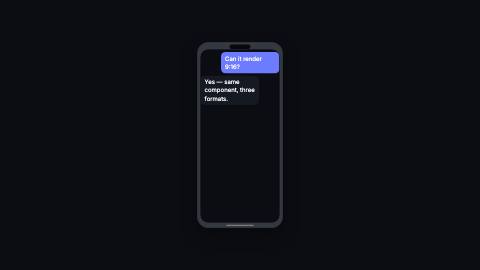
Message thread that shows three bouncing typing dots before a "them" reply, pops bubbles in, and scrolls up as it fills.
ChatThread, reply
Installation
npx shadcn add https://www.reelcn.dev/r/chat-thread.jsonFiles land in src/reelcn/ with the items it builds on.
Usage
<PhoneFrame>
  <ChatThread
    messages={[
      { from: "me", text: "Can it render 9:16?", at: 0 },
      { from: "them", text: "Yes. Same component, three formats.", at: 30 },
    ]}
  />
</PhoneFrame>
Props
PropTypeDescription
delaynumberFrames to wait before entering.
durationnumberEnter duration in frames. Defaults to 0.6s. Some items reuse
duration for an unrelated local timing. See that item's own prop docs.exitnumber | booleanExit at the end of the parent `<Sequence>`.
false keeps it on screen, a number sets the exit length in frames.motionMotionPersonalityOverride the theme's motion personality.
posterbooleanRenders fully entered, with no exit: for a still frame or thumbnail. Defaults to
false.holdFramesnumberDelays the start of the exit window by this many frames, for a minimum on-screen hold. Defaults to
0.messages*ChatMessage[]
typingDurationnumberFrames the typing dots show before a "them" message lands. Defaults to 0.6s. 0 skips the dots.
widthnumberVisible thread width in design units. Default
460.heightnumberVisible thread height in design units. Older bubbles scroll out the top once it's full. Default
480.fontSizenumberLargest font size in design units. Default
24.backgroundstring
meColorstring"me" bubble fill. Defaults to the theme accent.
meTextColorstring
themColorstring"them" bubble fill. Defaults to the theme surface.
themTextColorstring
radiusnumber
styleCSSProperties
classNamestring
Built from
Use
- A DM, support chat or group thread inside a `phone-frame` or app mockup
- Showing a bot or assistant "typing" before it answers
Avoid
- A single command-and-output log. Use
terminal
Guides
Components take their colors from a theme, their timing from motion props and their layout from the canvas.
Source
registry/items/chat-thread.tsx
/**
 * @title Chat Thread
 * @category product
 * @description Message thread that shows three bouncing typing dots before a "them" reply, pops bubbles in, and scrolls up as it fills.
 * @duration data-driven
 * @use A DM, support chat or group thread inside a `phone-frame` or app mockup
 * @use Showing a bot or assistant "typing" before it answers
 * @avoid A single command-and-output log. Use `terminal`
 * @tags chat, messages, dm, bubbles, typing, conversation
 * @example
 * <PhoneFrame>
 *   <ChatThread
 *     messages={[
 *       { from: "me", text: "Can it render 9:16?", at: 0 },
 *       { from: "them", text: "Yes. Same component, three formats.", at: 30 },
 *     ]}
 *   />
 * </PhoneFrame>
 */
import type React from "react";
import { type MotionProps, tween, useMotion, useTheme, useViewport } from "./core";

export type ChatMessage = {
  from: "me" | "them";
  text: string;
  /** Frame this message lands, counted from `delay`. A "them" message shows typing dots for `typingDuration` frames before it. */
  at: number;
};

export type ChatThreadProps = MotionProps & {
  messages: ChatMessage[];
  /** Frames the typing dots show before a "them" message lands. Defaults to 0.6s. 0 skips the dots. */
  typingDuration?: number;
  /** Visible thread width in design units. */
  width?: number;
  /** Visible thread height in design units. Older bubbles scroll out the top once it's full. */
  height?: number;
  /** Largest font size in design units. */
  fontSize?: number;
  background?: string;
  /** "me" bubble fill. Defaults to the theme accent. */
  meColor?: string;
  meTextColor?: string;
  /** "them" bubble fill. Defaults to the theme surface. */
  themColor?: string;
  themTextColor?: string;
  radius?: number;
  style?: React.CSSProperties;
  className?: string;
};

/** Rough wrapped line count at `perLine` characters per line. Good enough to reserve bubble height without measuring the DOM. */
function wrappedLines(text: string, perLine: number): number {
  const words = text.split(" ");
  let lines = 1;
  let column = 0;
  for (const word of words) {
    const size = word.length + (column > 0 ? 1 : 0);
    if (column > 0 && column + size > perLine) {
      lines++;
      column = word.length;
    } else {
      column += size;
    }
  }
  return lines;
}

function TypingDots({ frame, color, size }: { frame: number; color: string; size: number }) {
  const dot = size * 0.22;
  return (
    <div style={{ display: "flex", gap: dot * 0.7 }}>
      {[0, 1, 2].map((index) => (
        <div
          key={index}
          style={{
            width: dot,
            height: dot,
            borderRadius: "50%",
            background: color,
            translate: `0 ${Math.sin(frame * 0.35 + index * 1.1) * dot * 0.5}px`,
          }}
        />
      ))}
    </div>
  );
}

export function ChatThread({
  messages,
  typingDuration,
  width = 460,
  height = 480,
  fontSize = 24,
  background,
  meColor,
  meTextColor,
  themColor,
  themTextColor,
  radius,
  style,
  className,
  ...motion
}: ChatThreadProps) {
  const theme = useTheme();
  const { u } = useViewport();
  const m = useMotion(motion);
  const dotsFrames = typingDuration ?? Math.round(m.fps * 0.6);
  const boxW = u(width);
  const boxH = u(height);
  const fontPx = u(fontSize);
  const padX = u(16);
  const padY = u(10);
  const gap = u(10);
  const lineH = fontPx * 1.35;
  const bubbleMaxW = boxW * 0.74;
  const perLine = Math.max(4, Math.floor((bubbleMaxW - padX * 2) / (fontPx * 0.56)));
  const appearFrames = Math.round(m.fps * 0.3);
  const popFrames = Math.round(m.fps * 0.35);

  const rows = messages.map((message) => {
    const lines = wrappedLines(message.text, perLine);
    const rowH = lines * lineH + padY * 2;
    const typingFrom = message.from === "them" ? message.at - dotsFrames : message.at;
    return { message, rowH, typingFrom };
  });

  let top = 0;
  const positioned = rows.map((row) => {
    const y = top;
    top += row.rowH + gap;
    return { ...row, y };
  });

  const appearOf = (from: number) =>
    Math.min(Math.max(tween(m.frame, m.fps, { from: m.delay + from, duration: appearFrames, motion: "smooth" }), 0), 1);

  const filled = positioned.reduce((sum, row) => sum + appearOf(row.typingFrom) * (row.rowH + gap), 0);
  const scroll = Math.max(0, filled - boxH + padY * 2);

  return (
    <div
      className={className}
      style={{
        position: "relative",
        width: boxW,
        height: boxH,
        overflow: "hidden",
        borderRadius: u(radius ?? theme.radius),
        background: background ?? theme.colors.background,
        fontFamily: theme.fonts.body,
        opacity: 1 - m.exit,
        ...style,
      }}
    >
      <div
        style={{
          position: "absolute",
          left: 0,
          right: 0,
          top: padY,
          padding: `0 ${padX}px`,
          translate: `0 ${-scroll}px`,
        }}
      >
        {positioned.map((row, index) => {
          const { message, rowH, typingFrom, y } = row;
          const isMe = message.from === "me";
          const shown = appearOf(typingFrom);
          const typing = !isMe && dotsFrames > 0 && m.frame < m.delay + message.at;
          const pop = Math.max(
            0,
            tween(m.frame, m.fps, { from: m.delay + message.at, duration: popFrames, motion: "bouncy" }),
          );
          return (
            <div
              key={index}
              style={{
                position: "absolute",
                top: y,
                left: 0,
                right: 0,
                display: "flex",
                justifyContent: isMe ? "flex-end" : "flex-start",
                opacity: shown,
                translate: `0 ${(1 - shown) * u(14)}px`,
              }}
            >
              <div
                style={{
                  maxWidth: bubbleMaxW,
                  minHeight: rowH,
                  display: "flex",
                  alignItems: "center",
                  padding: `${padY}px ${padX}px`,
                  borderRadius: u(radius ?? theme.radius * 0.9),
                  background: isMe ? (meColor ?? theme.colors.accent) : (themColor ?? theme.colors.surface),
                  color: isMe
                    ? (meTextColor ?? theme.colors.accentForeground)
                    : (themTextColor ?? theme.colors.foreground),
                  fontSize: fontPx,
                  lineHeight: `${lineH}px`,
                  scale: typing ? "1" : String(0.85 + 0.15 * pop),
                }}
              >
                {typing ? (
                  <TypingDots frame={m.frame} color={themTextColor ?? theme.colors.muted} size={fontPx} />
                ) : (
                  message.text
                )}
              </div>
            </div>
          );
        })}
      </div>
    </div>
  );
}