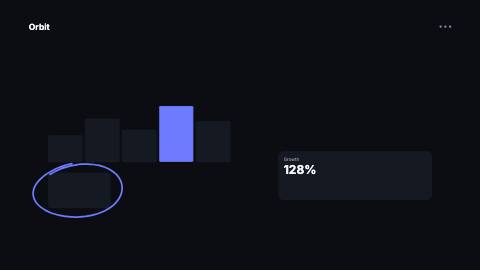
Scribble circle
Hand-drawn loop that circles a target area and overshoots its own start like a marker stroke, with seeded wobble.
ScribbleCircle, badge
Installation
npx shadcn add https://www.reelcn.dev/r/scribble-circle.jsonFiles land in src/reelcn/ with the items it builds on. Dependencies: remotion.
Usage
<ScribbleCircle target={{ x: 65, y: 29, width: 23, height: 17 }} />Props
PropTypeDescription
delaynumberFrames to wait before entering.
durationnumberEnter duration in frames. Defaults to 0.6s. Some items reuse
duration for an unrelated local timing. See that item's own prop docs.exitnumber | booleanExit at the end of the parent `<Sequence>`.
false keeps it on screen, a number sets the exit length in frames.motionMotionPersonalityOverride the theme's motion personality.
posterbooleanRenders fully entered, with no exit: for a still frame or thumbnail. Defaults to
false.holdFramesnumberDelays the start of the exit window by this many frames, for a minimum on-screen hold. Defaults to
0.target*{ x: number; y: number; width: number; height: number; }Area to circle, in % of the canvas (0-100):
x/y is the top-left corner, width/height the size.
Percentages keep the loop on the same UI when the canvas changes format.paddingnumberExtra space between the target and the loop, in design units. Default
10.turnsnumberHow far around the loop goes. 1 closes it exactly; a little more reads as hand-drawn. Default
1.1.strokeWidthnumberStroke width in design units. Default
7.colorstringStroke color. Defaults to the theme accent.
wobblenumberHow uneven the loop is, 0-1. Default
0.5.seedstring | numberVaries the wobble and tilt; the same seed always draws the same loop. Default
"scribble".styleCSSProperties
classNamestring
Built from
Use
- Circling a number, button or face in a screenshot or recording
- Marking the one thing viewers should look at in a busy frame
Avoid
- Pointing at something from a distance. Use
arrow
Guides
Components take their colors from a theme, their timing from motion props and their layout from the canvas.
Source
registry/items/scribble-circle.tsx
/**
 * @title Scribble Circle
 * @category overlays
 * @description Hand-drawn loop that circles a target area and overshoots its own start like a marker stroke, with seeded wobble.
 * @duration 18
 * @use Circling a number, button or face in a screenshot or recording
 * @use Marking the one thing viewers should look at in a busy frame
 * @avoid Pointing at something from a distance. Use `arrow`
 * @tags annotation, circle, marker, hand-drawn, doodle
 * @example
 * <ScribbleCircle target={{ x: 65, y: 29, width: 23, height: 17 }} />
 */
import type React from "react";
import { AbsoluteFill, random } from "remotion";
import { type MotionProps, StrokeOverlay, useMotion, useTheme, useViewport } from "./core";

export type ScribbleCircleProps = MotionProps & {
  /**
   * Area to circle, in % of the canvas (0-100): `x`/`y` is the top-left corner, `width`/`height` the size.
   * Percentages keep the loop on the same UI when the canvas changes format.
   */
  target: { x: number; y: number; width: number; height: number };
  /** Extra space between the target and the loop, in design units. */
  padding?: number;
  /** How far around the loop goes. 1 closes it exactly; a little more reads as hand-drawn. */
  turns?: number;
  /** Stroke width in design units. */
  strokeWidth?: number;
  /** Stroke color. Defaults to the theme accent. */
  color?: string;
  /** How uneven the loop is, 0-1. */
  wobble?: number;
  /** Varies the wobble and tilt; the same seed always draws the same loop. */
  seed?: string | number;
  style?: React.CSSProperties;
  className?: string;
};

export function ScribbleCircle({
  target,
  padding = 10,
  turns = 1.1,
  strokeWidth = 7,
  color,
  wobble = 0.5,
  seed = "scribble",
  style,
  className,
  ...motion
}: ScribbleCircleProps) {
  const theme = useTheme();
  const { u, width, height } = useViewport();
  const m = useMotion(motion);
  const r = (key: string) => random(`${seed}-${key}`);
  const cx = ((target.x + target.width / 2) / 100) * width;
  const cy = ((target.y + target.height / 2) / 100) * height;
  // An ellipse through the corners of a box is √2 times its half-size; a little less lets the loop graze them.
  const rx = (target.width / 200) * width * Math.SQRT2 * 0.96 + u(padding);
  const ry = (target.height / 200) * height * Math.SQRT2 * 0.96 + u(padding);
  const tilt = (r("tilt") - 0.5) * 0.14;
  const start = -Math.PI * 0.75 + (r("start") - 0.5) * 0.4;
  const phaseA = r("phaseA") * Math.PI * 2;
  const phaseB = r("phaseB") * Math.PI * 2;
  const steps = Math.max(Math.round(48 * turns), 24);

  const points = Array.from({ length: steps + 1 }, (_, i) => {
    const t = i / steps;
    const theta = start + t * turns * Math.PI * 2;
    // A slow outward spiral stops the overshoot from retracing the start of the loop.
    const spiral = 1 + (t - 0.5) * 0.08;
    const bump = 1 + wobble * 0.06 * (Math.sin(2 * theta + phaseA) + 0.6 * Math.sin(3 * theta + phaseB));
    const ex = Math.cos(theta) * rx * spiral * bump;
    const ey = Math.sin(theta) * ry * spiral * bump;
    return {
      x: cx + ex * Math.cos(tilt) - ey * Math.sin(tilt),
      y: cy + ex * Math.sin(tilt) + ey * Math.cos(tilt),
    };
  });
  // Quadratic segments through the midpoints give a smooth stroke from a polyline.
  const d = points.reduce((path, point, i) => {
    if (i === 0) return `M${point.x.toFixed(1)} ${point.y.toFixed(1)}`;
    const next = points[i + 1];
    if (!next) return `${path} L${point.x.toFixed(1)} ${point.y.toFixed(1)}`;
    const mx = (point.x + next.x) / 2;
    const my = (point.y + next.y) / 2;
    return `${path} Q${point.x.toFixed(1)} ${point.y.toFixed(1)} ${mx.toFixed(1)} ${my.toFixed(1)}`;
  }, "");
  const drawn = Math.min(Math.max(m.enter, 0), 1);

  return (
    <AbsoluteFill className={className} style={{ pointerEvents: "none", opacity: 1 - m.exit, ...style }}>
      <svg
        aria-hidden="true"
        width={width}
        height={height}
        viewBox={`0 0 ${width} ${height}`}
        style={{ position: "absolute", left: 0, top: 0, overflow: "visible" }}
      >
        <g opacity={drawn > 0 ? 1 : 0}>
          <StrokeOverlay
            d={d}
            kind={theme.stroke}
            seed={String(seed)}
            color={color ?? theme.colors.accent}
            strokeWidth={u(strokeWidth)}
            drawn={drawn}
            extraProps={{ strokeLinecap: "round", strokeLinejoin: "round" }}
          />
        </g>
      </svg>
    </AbsoluteFill>
  );
}