Confetti
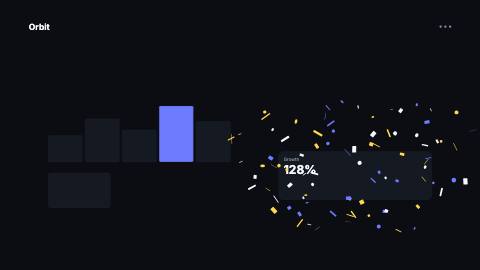
Seeded confetti burst with closed-form physics: launch spread, gravity, air drag, spin and flutter, in theme colors.
Confetti, launch
Installation
npx shadcn add https://www.reelcn.dev/r/confetti.jsonFiles land in src/reelcn/ with the items it builds on. Dependencies: remotion.
Usage
<Sequence from={45} durationInFrames={90}>
  <Confetti origin={{ x: 50, y: 70 }} count={120} />
</Sequence>
Props
PropTypeDescription
delaynumberFrames to wait before entering.
durationnumberEnter duration in frames. Defaults to 0.6s. Some items reuse
duration for an unrelated local timing. See that item's own prop docs.exitnumber | booleanExit at the end of the parent `<Sequence>`.
false keeps it on screen, a number sets the exit length in frames.motionMotionPersonalityOverride the theme's motion personality.
posterbooleanRenders fully entered, with no exit: for a still frame or thumbnail. Defaults to
false.holdFramesnumberDelays the start of the exit window by this many frames, for a minimum on-screen hold. Defaults to
0.origin{ x: number; y: number; }Launch point in % of the canvas (0-100 on each axis), so it stays put at every aspect ratio. Default
{ x: 50, y: 60 }.countnumberNumber of pieces. Default
90.anglenumberLaunch direction in degrees: -90 is straight up, 0 is to the right. Default
-90.spreadnumberWidth of the launch cone in degrees. Default
70.powernumberLaunch speed of the fastest piece, in design units per second. Default
2200.gravitynumberDownward acceleration in design units per second squared. Default
1000.dragnumberAir drag per second. Higher values stop pieces sooner and slow their fall. Default
2.2.sizenumberPiece size in design units. Default
22.lifenumberFrames each piece lives before it has faded out. Defaults to 3s.
shapesConfettiShape[] Default
["rect", "strip", "circle"].colorsstring[]Piece colors. Defaults to the theme accent, highlight and foreground.
seedstring | numberChange it for a different burst; the same seed always renders the same frames. Default
"confetti".styleCSSProperties
classNamestring
Built from
Use
- Launches, milestones and end cards
- Celebrating the moment a number or result lands
Avoid
- Emphasis on a single word or button. Use
sparkle-burst
Guides
Components take their colors from a theme, their timing from motion props and their layout from the canvas.
Source
registry/items/confetti.tsx
/**
 * @title Confetti
 * @category overlays
 * @description Seeded confetti burst with closed-form physics: launch spread, gravity, air drag, spin and flutter, in theme colors.
 * @duration 90
 * @use Launches, milestones and end cards
 * @use Celebrating the moment a number or result lands
 * @avoid Emphasis on a single word or button. Use `sparkle-burst`
 * @tags celebration, particles, party, burst, physics
 * @example
 * <Sequence from={45} durationInFrames={90}>
 *   <Confetti origin={{ x: 50, y: 70 }} count={120} />
 * </Sequence>
 */
import type React from "react";
import { AbsoluteFill, random } from "remotion";
import { type MotionProps, tween, useMotion, useTheme, useViewport } from "./core";

export type ConfettiShape = "rect" | "strip" | "circle";

export type ConfettiProps = MotionProps & {
  /** Launch point in % of the canvas (0-100 on each axis), so it stays put at every aspect ratio. */
  origin?: { x: number; y: number };
  /** Number of pieces. */
  count?: number;
  /** Launch direction in degrees: -90 is straight up, 0 is to the right. */
  angle?: number;
  /** Width of the launch cone in degrees. */
  spread?: number;
  /** Launch speed of the fastest piece, in design units per second. */
  power?: number;
  /** Downward acceleration in design units per second squared. */
  gravity?: number;
  /** Air drag per second. Higher values stop pieces sooner and slow their fall. */
  drag?: number;
  /** Piece size in design units. */
  size?: number;
  /** Frames each piece lives before it has faded out. Defaults to 3s. */
  life?: number;
  shapes?: ConfettiShape[];
  /** Piece colors. Defaults to the theme accent, highlight and foreground. */
  colors?: string[];
  /** Change it for a different burst; the same seed always renders the same frames. */
  seed?: string | number;
  style?: React.CSSProperties;
  className?: string;
};

/**
 * Distance covered `t` seconds after launch at speed `v0`, under constant acceleration `accel` and linear air drag `k`.
 * Closed form, so every frame is computed on its own and renders identically in any order.
 */
function travel(v0: number, accel: number, k: number, t: number) {
  const settle = (1 - Math.exp(-k * t)) / k;
  return v0 * settle + (accel / k) * (t - settle);
}

export function Confetti({
  origin = { x: 50, y: 60 },
  count = 90,
  angle = -90,
  spread = 70,
  power = 2200,
  gravity = 1000,
  drag = 2.2,
  size = 22,
  life,
  shapes = ["rect", "strip", "circle"],
  colors,
  seed = "confetti",
  style,
  className,
  ...motion
}: ConfettiProps) {
  const theme = useTheme();
  const { u, width, height } = useViewport();
  const m = useMotion(motion);
  const palette =
    colors && colors.length > 0 ? colors : [theme.colors.accent, theme.colors.highlight, theme.colors.foreground];
  const lifeFrames = life ?? Math.round(m.fps * 3);
  const k = Math.max(drag, 0.001);
  const x0 = (origin.x / 100) * width;
  const y0 = (origin.y / 100) * height;

  const pieces = Array.from({ length: count }, (_, i) => {
    const r = (key: string) => random(`${seed}-${i}-${key}`);
    // A few frames of launch jitter keep the burst from reading as one solid pop.
    const launch = m.delay + Math.floor(r("launch") * 3);
    const age = m.frame - launch;
    if (age < 0 || age >= lifeFrames) return null;
    const t = age / m.fps;
    const direction = ((angle + (r("angle") - 0.5) * spread) * Math.PI) / 180;
    const speed = u(power) * (0.45 + 0.55 * r("speed"));
    const sway = Math.sin(t * (2 + 3 * r("sway")) + r("phase") * Math.PI * 2) * u(16) * Math.min(t, 1);
    const x = x0 + travel(Math.cos(direction) * speed, 0, k, t) + sway;
    const y = y0 + travel(Math.sin(direction) * speed, u(gravity), k, t);
    const shape = shapes[Math.floor(r("shape") * shapes.length)] ?? "rect";
    const base = u(size) * (0.7 + 0.6 * r("size"));
    const w = shape === "strip" ? base * 0.35 : shape === "circle" ? base * 0.7 : base;
    const h = shape === "strip" ? base * 1.5 : shape === "circle" ? base * 0.7 : base * 0.6;
    const spin = r("rotation") * 360 + (r("spin") - 0.5) * 1440 * t;
    // Flutter: the piece turns edge-on and back, like paper tumbling through air.
    const flutter = Math.cos(t * (6 + 10 * r("flutter")) + r("phase") * Math.PI * 2);
    const grow = Math.min(tween(m.frame, m.fps, { from: launch, duration: m.enterFrames, motion: m.preset }), 1);
    const fade = Math.min((lifeFrames - age) / (lifeFrames * 0.3), 1);
    return (
      <div
        key={i}
        style={{
          position: "absolute",
          left: x - w / 2,
          top: y - h / 2,
          width: w,
          height: h,
          borderRadius: shape === "circle" ? "50%" : u(2),
          background: palette[Math.floor(r("color") * palette.length)],
          opacity: fade * (1 - m.exit),
          transform: `rotate(${spin}deg) scale(${grow * flutter}, ${grow})`,
        }}
      />
    );
  });

  return (
    <AbsoluteFill className={className} style={{ overflow: "hidden", pointerEvents: "none", ...style }}>
      {pieces}
    </AbsoluteFill>
  );
}