Glitch
A digital hit: RGB channel split and seeded horizontal slice offsets build to a peak, cut to the next scene, then settle.
Glitch, default
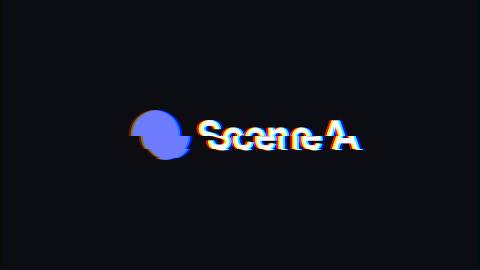
Installation
npx shadcn add https://www.reelcn.dev/r/glitch.jsonFiles land in src/reelcn/ with the items it builds on. Dependencies: @remotion/transitions, remotion.
Usage
<TransitionSeries>
  <TransitionSeries.Sequence durationInFrames={45}>
    <Hook />
  </TransitionSeries.Sequence>
  <TransitionSeries.Transition presentation={glitch({ intensity: 1.2 })} timing={linearTiming({ durationInFrames: 16 })} />
  <TransitionSeries.Sequence durationInFrames={60}>
    <Reveal />
  </TransitionSeries.Sequence>
</TransitionSeries>
Props
PropTypeDescription
intensitynumberScales the channel split and slice offsets.
slicesnumberMost horizontal slices displaced at once, reached at the cut.
colorsstring[]Colors of the thin bars that flash near the cut. Defaults to the theme accent and highlight.
seedstring | number
Built from
Use
- Tech, gaming and music edits
- Hard cuts that need a jolt of energy
Avoid
- Calm, premium or corporate pieces. Use
card-push
Guides
Components take their colors from a theme, their timing from motion props and their layout from the canvas.
Source
registry/items/glitch.tsx
/**
 * @title Glitch
 * @category transitions
 * @description A digital hit: RGB channel split and seeded horizontal slice offsets build to a peak, cut to the next scene, then settle.
 * @duration 16
 * @use Tech, gaming and music edits
 * @use Hard cuts that need a jolt of energy
 * @avoid Calm, premium or corporate pieces. Use `card-push`
 * @tags glitch, rgb, digital, cut, distortion
 * @example
 * <TransitionSeries>
 *   <TransitionSeries.Sequence durationInFrames={45}>
 *     <Hook />
 *   </TransitionSeries.Sequence>
 *   <TransitionSeries.Transition presentation={glitch({ intensity: 1.2 })} timing={linearTiming({ durationInFrames: 16 })} />
 *   <TransitionSeries.Sequence durationInFrames={60}>
 *     <Reveal />
 *   </TransitionSeries.Sequence>
 * </TransitionSeries>
 */
import type { TransitionPresentation, TransitionPresentationComponentProps } from "@remotion/transitions";
import { useId } from "react";
import { AbsoluteFill, random } from "remotion";
import { useTheme, useViewport } from "./core";

export type GlitchProps = {
  /** Scales the channel split and slice offsets. */
  intensity?: number;
  /** Most horizontal slices displaced at once, reached at the cut. */
  slices?: number;
  /** Colors of the thin bars that flash near the cut. Defaults to the theme accent and highlight. */
  colors?: string[];
  seed?: string | number;
};

// Each matrix keeps one color channel, so the three can be offset apart and screened back together.
const RED = "1 0 0 0 0  0 0 0 0 0  0 0 0 0 0  0 0 0 1 0";
const GREEN = "0 0 0 0 0  0 1 0 0 0  0 0 0 0 0  0 0 0 1 0";
const BLUE = "0 0 0 0 0  0 0 0 0 0  0 0 1 0 0  0 0 0 1 0";

function GlitchPresentation({
  children,
  presentationDirection,
  presentationProgress,
  presentationDurationInFrames,
  passedProps,
}: TransitionPresentationComponentProps<GlitchProps>) {
  const theme = useTheme();
  const { width, height, u } = useViewport();
  const filterId = `reelcn-glitch-${useId().replace(/[^\w-]/g, "")}`;
  const { intensity = 1, slices = 6, seed = "glitch" } = passedProps;
  const colors = passedProps.colors ?? [theme.colors.accent, theme.colors.highlight];
  const visible = presentationDirection === "entering" ? presentationProgress >= 0.5 : presentationProgress < 0.5;
  // 0 at both ends, full at the cut. Both scenes compute the same pattern, so the cut lands mid-glitch.
  const peak = (1 - Math.abs(presentationProgress * 2 - 1)) ** 1.5 * intensity;
  // A fresh pattern on every frame of the transition.
  const frame = Math.floor(presentationProgress * presentationDurationInFrames);
  const rand = (index: number, key: string) => random(`${seed}-${frame}-${index}-${key}`);
  const shift = u(22) * peak;
  const bands = Array.from({ length: Math.ceil(slices * Math.min(peak, 1)) }, (_, index) => ({
    y: Math.round(rand(index, "y") * height),
    h: Math.round(u(10 + rand(index, "h") * 110)),
    dx: (rand(index, "x") - 0.5) * u(320) * peak,
  }));
  const bars = colors
    .map((color, index) => ({
      color,
      on: rand(index, "bar") < peak - 0.3,
      x: rand(index, "bx") * width * 0.5,
      y: rand(index, "by") * height,
      w: width * (0.25 + rand(index, "bw") * 0.5),
      h: u(4 + rand(index, "bh") * 14),
    }))
    .filter((bar) => visible && bar.on);

  return (
    <AbsoluteFill style={{ opacity: visible ? 1 : 0 }}>
      <svg width={0} height={0} style={{ position: "absolute" }} aria-hidden="true">
        <filter id={filterId} x="0" y="0" width="100%" height="100%" colorInterpolationFilters="sRGB">
          {bands.map((band, index) => (
            <feOffset
              key={index}
              in="SourceGraphic"
              dx={band.dx}
              dy={0}
              x={0}
              y={band.y}
              width={width}
              height={band.h}
              result={`band${index}`}
            />
          ))}
          <feMerge result="sliced">
            <feMergeNode in="SourceGraphic" />
            {bands.map((_, index) => (
              <feMergeNode key={index} in={`band${index}`} />
            ))}
          </feMerge>
          <feColorMatrix in="sliced" type="matrix" values={RED} result="red" />
          <feOffset in="red" dx={-shift} dy={0} result="redShifted" />
          <feColorMatrix in="sliced" type="matrix" values={GREEN} result="green" />
          <feColorMatrix in="sliced" type="matrix" values={BLUE} result="blue" />
          <feOffset in="blue" dx={shift} dy={0} result="blueShifted" />
          <feBlend in="redShifted" in2="green" mode="screen" result="redGreen" />
          <feBlend in="redGreen" in2="blueShifted" mode="screen" />
        </filter>
      </svg>
      <AbsoluteFill style={{ filter: visible && peak > 0.01 ? `url(#${filterId})` : undefined }}>
        {children}
      </AbsoluteFill>
      {bars.map((bar, index) => (
        <div
          key={index}
          style={{ position: "absolute", left: bar.x, top: bar.y, width: bar.w, height: bar.h, background: bar.color }}
        />
      ))}
    </AbsoluteFill>
  );
}

export function glitch(props: GlitchProps = {}): TransitionPresentation<GlitchProps> {
  return { component: GlitchPresentation, props };
}